SQLite
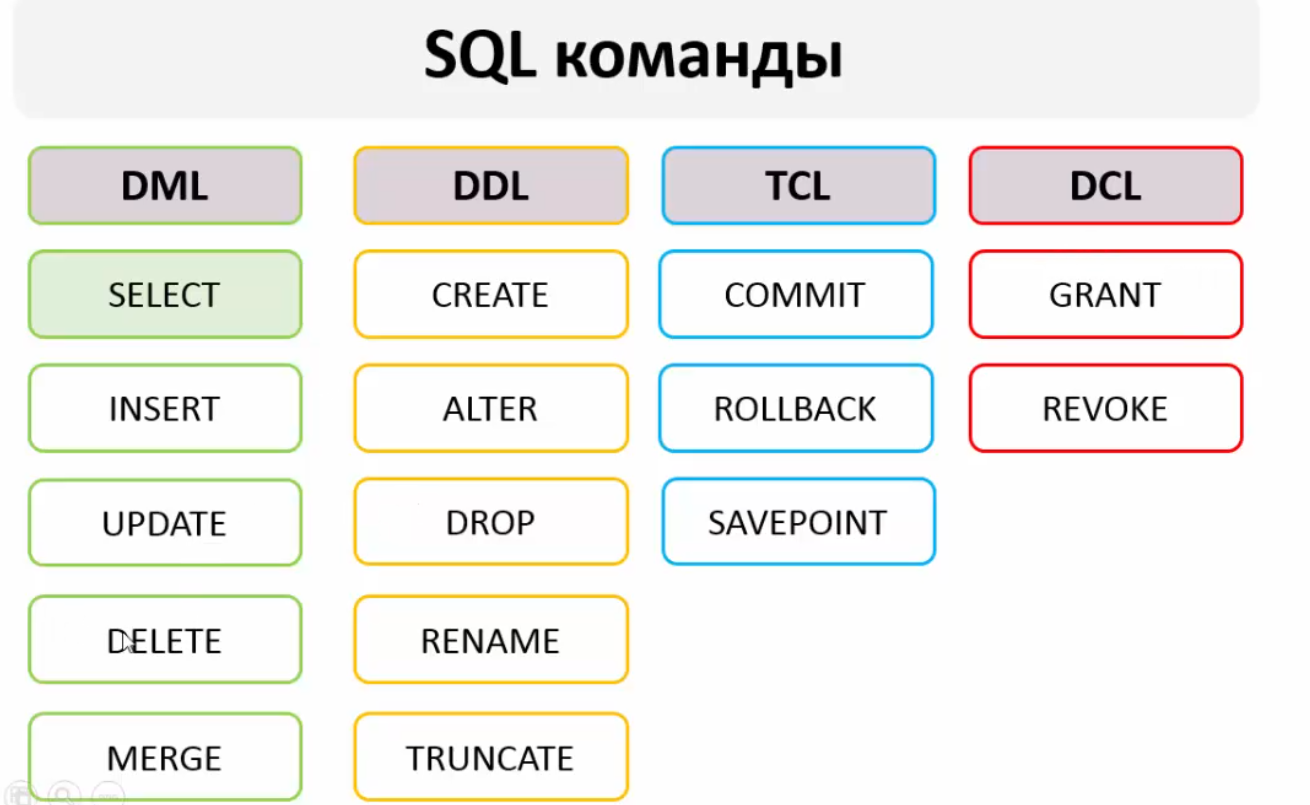 (Data Manipulation Language, Data Definition Language, Transaction Control Language, Data Control Language)
For learning purposes, I installed sqlite3 and sqlite3 browser on Ubuntu:
For nice display:
(This is for learning purposes only; for Android this is not needed, and SQLite does not have a login/password concept)
1) Create a database:
2) Create a table:
CREATE TABLE anyTableName (
FirstFieldName INTEGER PRIMARY KEY AUTOINCREMENT,
SecondFieldName TEXT,
ThirdFieldName INTEGER);
PrimaryKey means this field is the primary one. Autoincrement means this field will have the next incremental value for each new row.
3) A database file will be created (most likely on the desktop); if desired, you can try opening it graphically via sqlitebrowser and view the fields.
4) Insert data into the table:
INSERT INTO AnyTableName (SecondFieldName, ThirdFieldName) VALUES ('blabla', 123);


INSERT INTO artists DEFAULT VALUES;
5) View table records: -- All records:
-- Display all ids
-- Display all ids and names
-- Display all id+name+age
-- distinct - unique. Display all unique records in the Quantity field of the invoice_items table
-- Select columns invoicelineid, invoiceid, trackid, quantity while modifying invoiceid+100 and trackid*3 from the invoice_items table)
-- Display 5 items with an offset of 4
-- String concatenation
SELECT firstname || lastname FROM customers;

SELECT 'My name is '||firstname||' and surname is '|| lastname FROM customers;
ALIAS: For nice column name display
SELECT 'My name is '||firstname||' and surname is '|| lastname as "Name introduction" FROM customers;


SELECT 'Мар''яна' as "Name introduction";
(the column will be named "Name introduction") (single quotes doubled mean an apostrophe)
6) WHERE filtering:
(display name fields from myFirstTable where the id field is greater than or equal to 3)
(Values between) **BETWEEN '2010-01-01' AND '2010-01-31' - for dates. You can also use NOT BETWEEN
(Selects rows where EmployeeId equals 2, 4, 5, or 8)
(Select all rows from the invoices table where the BillingState column is null)
-- Display all rows from the employees table where the LastName column consists of 2 characters and starts with P) -- Display all rows from the employees table where the LastName column starts with P)
(Conditions can be combined using OR and AND)
-- You can escape % and _ as follows:
(Instead of LIKE you can use GLOB 'Unixlike_patterns'
7) SORTING!
SELECT firstName, LastName, fax FROM customers ORDER BY fax(or expression, function, or number-column index, e.g. 2) DESC(or ASC) NULLS FIRST(or LAST);
(you can sort by column, expression or number, in descending or ascending order, and display NULLs first or last)
(Composite sorting: sorts by id; for those with the same id, sorts by lastName; for those with the same id and lastName, sorts by salary)
8) Deleting a table row:
(deletes the row where id=6)
8) Updating data in a table:
(In myFirstTable, set the name field to "new Name" for the record where id=5)
9) Renaming a table:
10) Deleting a table:
Working with dates: https://www.sqlite.org/lang_datefunc.html All available functions are well documented
Data types: https://www.sqlite.org/datatype3.html
All SQLite functions: https://www.sqlite.org/lang_corefunc.html
Aggregate functions: https://www.sqlite.org/lang_aggfunc.html (IMPORTANT: in selects with aggregate functions, you cannot use regular (single row) functions together)
AVG, SUM, COUNT, MIN, MAX (arithmetic mean, sum of all int values in columns, row count, minimum and maximum values in a column)
You can read about REPLACE here: https://www.sqlitetutorial.net/sqlite-replace-statement/
The idea of the REPLACE statement is that when a UNIQUE or PRIMARY KEY constraint violation occurs, it does the following:
In the second step, if any constraint violation e.g., NOT NULL constraint occurs, the REPLACE statement will abort the action and roll back the transaction.
Example:
(syntactically similar to INSERT)
Attach another database:
***ALTER TABLE
Used for 3 things:
- Rename a table
- Add a column
- Rename a column
Example:
ALTER TABLE devices RENAME TO equipment;
ALTER TABLE table_name ADD COLUMN column_definition;
ALTER TABLE table_name RENAME COLUMN current_name TO new_name;
***DYNAMICALLY COMPUTED columns:
If a column needs to be calculated depending on the values in other columns, then
column_name data_type [GENERATED ALWAYS] AS expression [VIRTUAL | STORED]
Example:
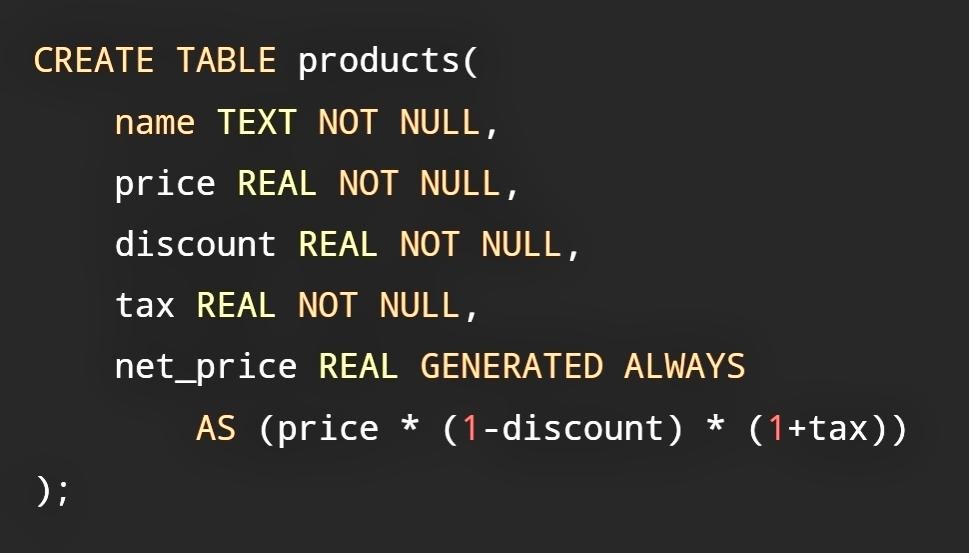
By default, if STORED is not specified at the end, it will be VIRTUAL.
VIRTUAL is calculated each time the column is accessed, while STORED is calculated and saved.